How to use a CSV file with JMeter
I’m testing a new site right now and part of my process required load testing of the “add to cart” functionality. To do this, I wanted to have multiple “users” all on the system at the same time, each adding the same item to their cart.
JMeter seemed like the logical way to deal with this, but figuring out how to get it to handle various usernames and passwords wasn’t that easy.
After some trial and error and a bunch of Googling I have it working, so thought I’d do a quick post on it for others to reference:
First, create a CSV file with the logins and passwords. You can just do this in a text editor, and the format should be:
username,password
username2,password2
username3,password3
Save that file in the bin directory where your JMeter installation lives. For this example, I saved the file as “logins.csv”.
Now go into JMeter and find the HTTP request step that you want to modify to use the values in this CSV file. Right click on it and go to Add > Config Element > CSV Data Set Config. This adds the CSV Data Set Config as a child of the HTTP request.
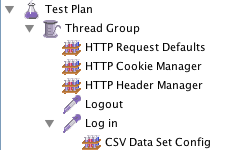
Your tree should now look like this:

In the tree above, you can see that I’m using the CSV data to modify the “Log in” HTTP Request.
Now click on the CSV Data Set Config step to modify it. Its screen looks like this:
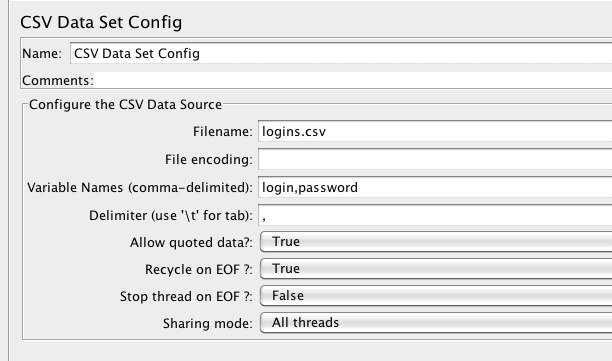
You’ll need to fill in at least 3 values on this screen:
- Filename: if your file is in the /bin directory, this can be just the filename. If it’s somewhere else, use the full path to the file.
- Variable names: this is the equivalent to a “column name” in a spreadsheet.
- Delimiter: comma is the default delimiter, but if your file uses tabs this is the place to say so.
The other fields are optional but may be useful to you. Read all about them on the JMeter CSV Data Set Config user manual.
After the CSV step is filled out correctly, go back to your HTTP request and change the value of the login and password fields to variables.
Here’s what that looks like in my test:
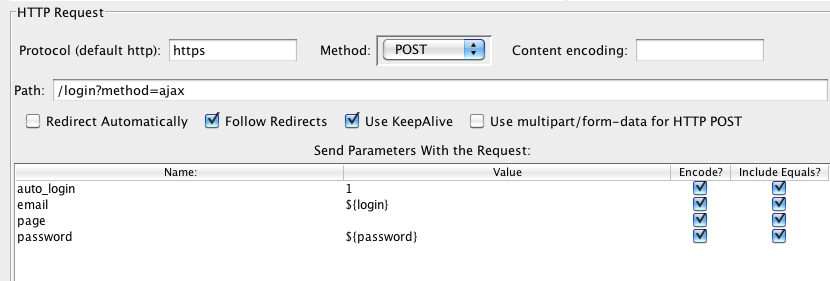
Because I had defined my variables as “login” and “password” in the previous step, in this step I need to use those variables as the value of the parameters that are being sent with the request. To do that I replaced the email address with ${login} and the password with ${password}.
Now when you run this test, JMeter will fill in the values of those two variables with what’s in the CSV file. The first thread will use row 1, the second thread uses row 2, etc etc.
If you have any questions please let me know!
Awesome Info!!!!This helped me a lot!!!!Thanks!
Hi!
Thanks for the blog. But I want to know how to make sure that JMeter is picking data from the csv data file. As for me there seems to be minimal change in performance even when using many users. Am I missing something? Is there a way to find it out?
Awesome, what I really needed to get started with JMeter is exactly what I found here. Thanks!
Hi,
I want to use CSV file for my script. Is that possible to get one row’s data from CSV file for each request?
For example, I have 10 different test cases and I have created 10 http requests. The data I am getting from .CSV file and there are 10 rows in the csv file. I want to get first request for first row, second request for second row, third request for third row and so on.
What do you mean by “The first thread will use row 1, the second thread uses row 2, etc etc”?
I’m not sure how deep to go in my clarification, so apologies if I go too far back =)
When you run jmeter, you can run multiple instances of the same test at the same time. When you do it, each test is running in its own “thread.” With the CSV file loaded as I’ve described, the values of each row in the CSV file will be fed to the test instances. So row 1 of the CSV file will be passed to thread 1 (instance 1) of your test, row 1 will be used by thread 2, etc.
Much appreciated!
Works very well !!!, thank you very much …
Hi ,
The material is really helpful. But I am not able to pass values for a particular variable only,where other variables have static value. My request type is JSON.Only two variables out of 10 should pick value from csv file.Rest should have the same data as in request.
Much appreciated if you could kindly help me get out of this situation.
Thanks in advance.
I love you. This is so useful, I have exactly look for it;)
Very helpful, Thanks!
Thanks for this blog info. It is realy useful.
Thanks for this, saved alot of time.
Thanks a lot, it is very helpfully.
I was creating a separate HTTP Request for each Test scenario. Now I have one HTTP Request and multiple parameters from the CSV file. Thanks for the information
¡Muchas gracias!
Nice posts for retrieving parameter values dynamically. Thanks!!
Muchas gracias !!! (thank you very much )
great post, thank you very much
Thanks, works nice
This is a very good post, I was looking for the same topic. And it just worked perfectly for me!!!! Thanks!!!!
A simple and nice tutorial. Like!!!